Layout Details
IMPORTANT NOTICE ABOUT SPACEHEY MUSIC
Before you start using SpaceHey Music, it is fundamental to know two things about the origin and support of this project:
1. SpaceHey Music is unofficial code: This project has been developed by fans for fans. It has not been created officially by the SpaceHey team. If you want to contribute and help the original platform, you can support it in the following ways:
Join the SpaceHey Music group: groups Spacehey Music
Join the MySpace group: groups Myspace
Become a SpaceHey volunteer: moderador voluntario
Contribute to SpaceHey: Support SpaceHey
If you are a music artist, you can sign up for the official SpaceHey document for future musical features: Official Artist Registration Form.
SETUP AND PERSONALIZATION GUIDE FOR YOUR SPACEHEY MUSIC PROFILE
In this section, I will detail the essential steps to activate and customize your artist profile on the SpaceHey platform. Follow these instructions carefully to integrate the code and add your content.
STEP 1: BASE CODE INSERTION
Copy and paste the base codes provided into the designated sections of your profile to establish the design structure:
- Part 1: Paste it into the "About Me" section. This first part contains the CSS for the entire code plus the SpaceHey Music navigation table.
- Part 2: Paste it into the "Who I'd like to meet" section. This second part contains the HTML for the "Upcoming Shows" table.
STEP 2: VISUAL AND LINK PERSONALIZATION
Once the codes are in place, you can begin customizing the visual elements and main links, starting with your music genre and banners:
MUSICAL GENRE CONFIGURATION:
To customize your musical genres, you must go to the CSS section and look for the ":root" part. Find the line that says --user-genres: "Genre 1 / Genre 2 / Genre 3";. There you can set a maximum of three musical genres. You can repeat them if you wish.
FULLY CUSTOMIZABLE BANNERS:
You have three banner spaces available. They are fully customizable in terms of images, colors, and borders, allowing you to reflect your musical identity:
To add the banners, go to the CSS section and look for the ":root" part. Find the following lines to change the links and replace them with the images you need:
--banner-top: url("https://your-top-banner-url.jpg");
--banner-bottom: url("https://your-bottom-banner-url.jpg");
--banner-sidebar: url("https://your-sidebar-banner-url.jpg");
1. Top banner: The most prominent visual element at the top of the profile. 2. Bottom banner: Located towards the end of the main profile content. 3. Mini banner: Strategically located above the blog/entry selection.
SPACEHEY MUSIC NAVIGATOR: ESSENTIAL LINKS
Next, you must modify the links in the music navigator so they direct users to the correct platforms:
- My Music: Introduce the direct link to your Spotify or SoundCloud profile.
- Music Videos: Add the link to your YouTube channel or the website where you upload your music videos.
- Shows: Include a general link to all your concerts. This is optional and only necessary if the "Upcoming Shows" table does not have enough space. If the table has enough space, simply place the "#" character in this field.
The other links (Featured Playlists, More Artists, Group, Forums) are usually already configured with a link, so you only need to modify the ones mentioned above.
TECHNICAL CLARIFICATIONS
SpaceHey Music modifies many things on your profile:
1. The "Blurbs" table is modified and will take the content from the "About Me" and "Who I'd like to meet" sections.
2. The "Who I'd like to meet" section is converted into the "Upcoming Shows" table.
3. The "Interests" table is also modified and converted into the "General Info" table.
I also want to clarify that SpaceHey Music can potentially "break" other layouts. I recommend that you put the SpaceHey Music code in first, and then apply any other design you want to use. You may need to inspect the designs you wish to use to make sure everything works well. It is a bit complicated to use, but it is the closest thing I could make to what MySpace Music once had.
Spacehey Music
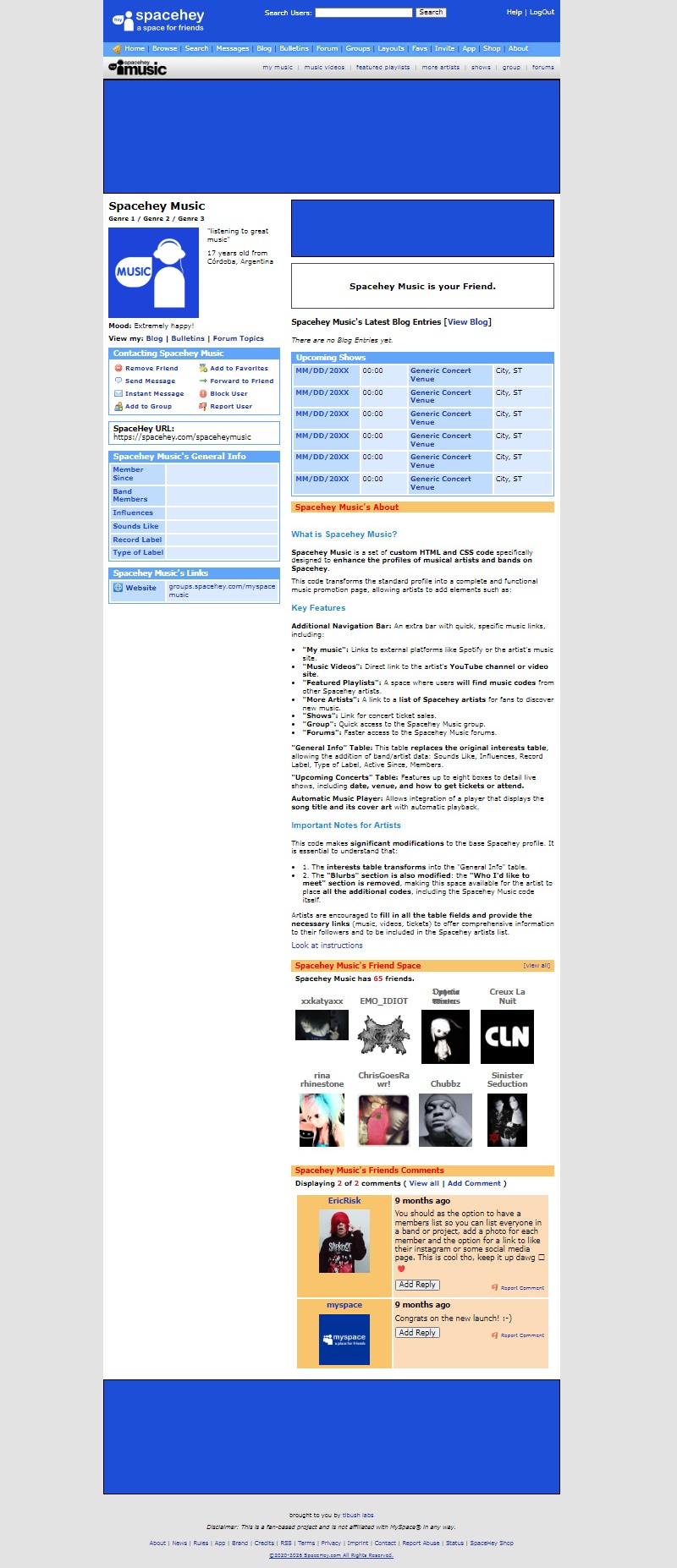
Code :
Copy and paste to About Me
Code :
Copy and paste to Who I'd like to meet
Our Generators & Editors


 Contact Graphics
 User Interfaces
 Group Templates
 Blog Themes
 Pixel Emotes
 Status Indicators
 Audio Codes
 Pointer Assets